




How to run Liferay with EnterpriseDB's PPAS as WCM

4 min read27.2.2014
In case you are evaluating a database for your project(s), you might come across an EnterpriseDB’s Postgres Plus Advanced Server (PPAS). This database is part of an EnterpriseDB (EDB) offering, which is a company providing optimizations, support, performance and security additions and tools (such as Oracle compatibility) for Postgres SQL database.
Lately I had a need to use a database for my Liferay portal other than the one that is bundled within Liferay installation, so I have picked up EnterpriseDB’s PPAS.
Below in my article, in a couple of easy steps, I’m providing a way to configure Liferay 6.2 with an EnterpriseDB’s PPAS as a Web Content Management (WCM) database. I have used Liferay 6.2 CE GA1 bundle with Tomcat app server and Postgres Plus Advanced Server version 9.3.
Please start with following:
Place EDB’s JDBC connector into Liferay libs
PPAS is shipped with many
connectors (ECPG/ODBC/JDBC)
. I will assume that you have installed your PPAS to /opt/ directory in your system. As Liferay connects to database through JDBC connector, it is necessary to copy or link EDB JDBC connector to lib/ext directory in Liferay’s tomcat home:
cp /opt/PostgresPlus/9*/connectors/jdbc/edb-jdbc16.jar lib/ext/edb-jdbc16.jar
        or
ln -s /opt/PostgresPlus/9*/connectors/jdbc/edb-jdbc16.jar lib/ext/edb-jdbc16.jar
This copies or creates a symbolic link to the edb-jdbc16.jar connector which is built on java JDK 1.6. You can choose edb-jdbc14.jar connector which is build on java JDK 1.4, both of them work.
Set Database dialect
Next it is necessary to tell to Liferay what dialect should be used, otherwise Liferay can’t determine dialect as it doesn’t know EnterpriseDB and deployment of Liferay will fail with following error message:
10:05:12,270 INFO  [liferay/convert_process-1][DialectDetector:71] Determine
        dialect for EnterpriseDB 9
10:05:12,272 ERROR [liferay/convert_process-1][DialectDetector:124]
        org.hibernate.HibernateException: Unable to determine Dialect to use
        [name=EnterpriseDB, majorVersion=9]; user must register resolver or
        explicitly set 'hibernate.dialect'
Edit or create portal-ext.properties file under webapps/ROOT/WEB-INF/classes/ and paste:
hibernate.dialect=org.hibernate.dialect.PostgresPlusDialectConfigure JDBC connector to EDB
All prerequisites has been met and we can configure JDBC connector itself. Open again portal-ext.properties file and paste
jdbc.default.driverClassName=com.edb.Driver
jdbc.default.url=jdbc:edb://EDB_SERVER:EDB_PORT/DB_NAME
jdbc.default.username=USERNAME
jdbc.default.password=PASSWORD
Note: Default EDB_PORT is 5444.
Start Liferay
Now you can start Liferay from Tomcat home by running
./bin/startup.shYou can see info messages indicating usage of PostgresPlus database in logs/catalina.out log file
13:49:09,028 INFO  [localhost-startStop-1][DBFactoryImpl:59]
             Using dialect org.hibernate.dialect.PostgresPlusDialect
and Liferay configuration pages comes with filled database config
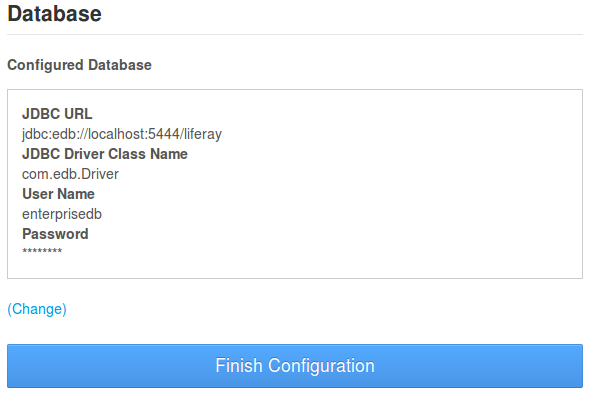
If you look at Postgres Enterprise Manager, you can see that Liferay has been setup to database you specify (in our case liferay) under public scheme.
Summary
You should be able to run a clean Liferay Portal with an EnterpriseDB’s Postgres Plus Advanced Server now and everything should be ready for you to use Liferay Portal, setup your site, create pages etc.
Enjoy!