




Integrating (ForgeRock) LDAP with MuleSoft

5 min read19.5.2016
Introduction
We continue exploring MuleSoft software and we wanted to know, how easy it is to integrate an LDAP Directory that is not documented by MuleSoft at the moment. It should be easy, right? It is just the same LDAP protocol. We gave a try to ForgeRock (OpenDJ).
You can find a short intro to the MuleSoft platform in our previous blog.
So in below article you will see what you need to do to connect MuleSoft Anypoint studio, using LDAP connector, with ForgeRock OpenDJ ldap server, what you need to configure and how you can test your final setup.
Prerequisites
I’m going to assume that:
- you have installed Anypoint Studio and you are familiar with it,
- you have installed LDAP connector via Anypoint Exchange in Anypoint Studio and
- you have installed the LDAP server; you can find simple install instructions in a previous blog of ours.
Example using the Connector
OpenLDAP and Microsoft Active Directory is supported according to Mulesoft’s documentation. We are working with a ForgeRock OpenDJ instance instead. Although the integration of OpenDJ with MuleSoft isn’t explicitly documented, there is a general LDAP connector developed, so we attempted to reuse it for OpenDJ. All one needs to do, when configuring the connector for ForgeRock OpenDJ is to start off the default LDAP configuration that’s created for OpenLDAP and tweak it to work with OpenDJ. Here is the procedure step by step:
Download example LDAP connectors
- Start up Anypoint Studio

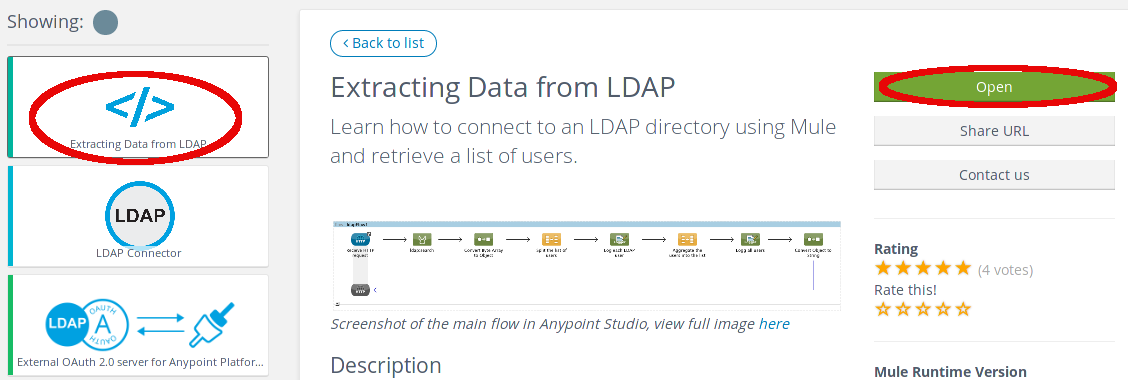
- Click on Anypoint Exchange
-
Search LDAP and select Extracting Data from LDAP
-
You can read the documentation and click the Open button for the example that you download to the studio
Configuring components in the project
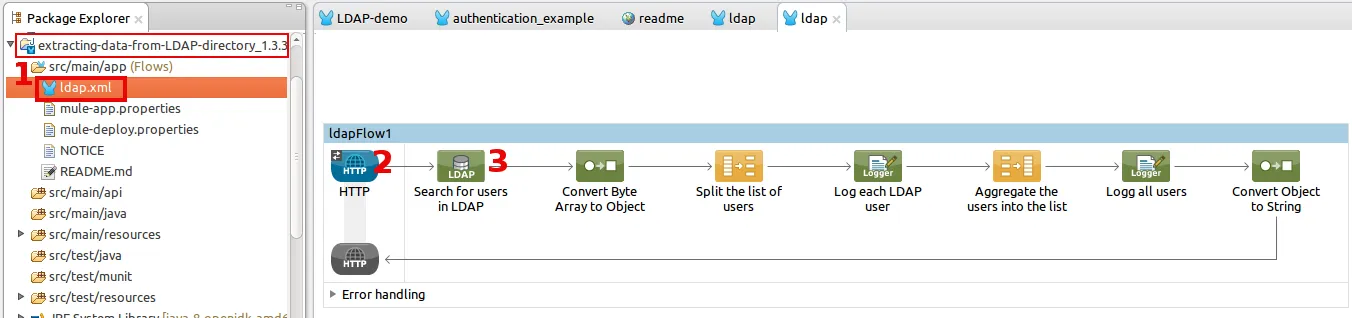
-
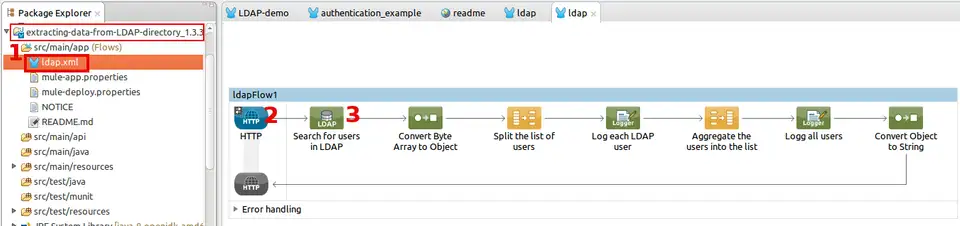
Use the Package Explorer to open the ldap.xml file of project extracting-data-from-LDAP-directory_1.3.3
-
Select HTTP connector in Message Flow
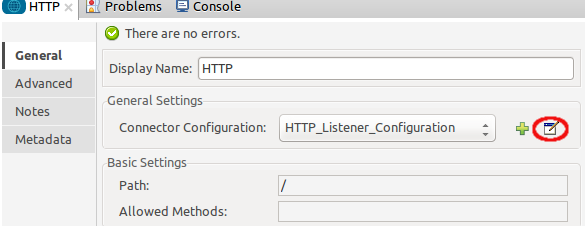
2.1 Click the Edit button for Connector Configuration or create a new connector configuration (Green plus button)
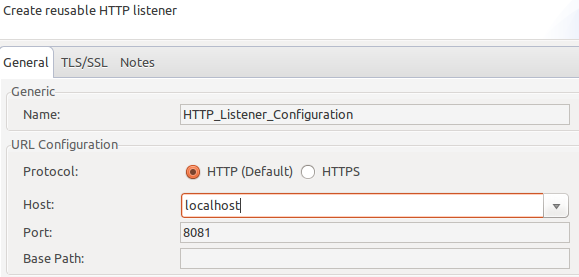
2.2 Fill Host and Port, example Host:localhost and Port:8081 and save settings
- Select LDAP connector in Message Flow
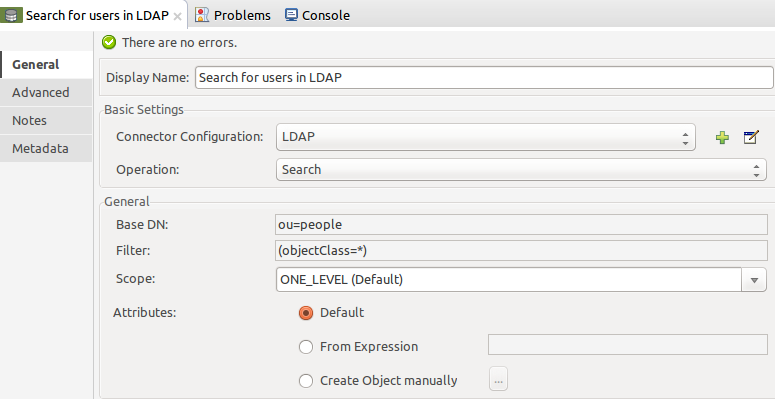
3.1 Click on Edit button for List Connector Configuration or create new Connector Configuration (Green plus button) in Connector Configuration.
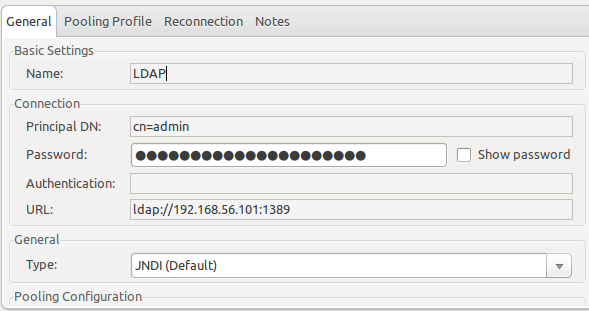
3.2 Fill Principal DN, Password, URL on your OpenDJ LDAP server. Watch out! This is different from the documentation. You need to change the default OpenLDAP configuration, where Principal DN equals to “cn=admin,dc=example,dc=com” to OpenDJ’s “cn=Directory Manager,cn=Root Dns,cn=config”. You can also enter an alias during the installation. I have entered “cn=admin”. Then save.
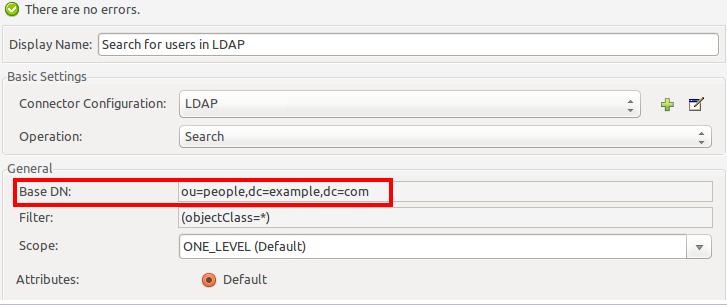
3.3 Modify Base DN in the LDAP Connector->General section to “ou=people,dc=example,dc=com”. Save.
- Save the project
We can start the sample now. Click on the project with the right mouse button and select Run as->Mule application. Once this is done, you can open a web browser and go to “localhost:8081”. You should be done with your configuration successfully, of your output looks similar to this one:
[dn: uid=user.38,ou=people,dc=example,dc=com
st: MI
homePhone: +1 103 029 5884
mail: user.38@maildomain.net
telephoneNumber: +1 108 598 2525
employeeNumber: 38
initials: ADA
mobile: +1 702 323 0280
postalAddress: Adda Acelvari$61703 Ash Street$Albuquerque, MI 34240
description: This is the description for Adda Acelvari.
cn: Adda Acelvari
l: Albuquerque
objectClass: person
objectClass: inetorgperson
objectClass: organizationalperson
objectClass: top
userPassword:: e1NTSEF9YUFoeEROd3N2MnN0Z1JCOVU1VGxGRjI2MFBMZEIyMzh6QUdZVGc9PQ==
uid: user.38
pager: +1 004 115 0851
givenName: Adda
postalCode: 34240
street: 61703 Ash Street
sn: Acelvari
, dn: uid=user.37,ou=people,dc=example,dc=com
st: MN
homePhone: +1 395 800 0815
mail: user.37@maildomain.net
telephoneNumber: +1 293 831 6702
employeeNumber: 37
initials: AXA
mobile: +1 297 338 1047
postalAddress: Adara Absi$77001 Fifteenth Street$Winston, MN 15751
description: This is the description for Adara Absi.
cn: Adara Absi
l: Winston
objectClass: person
objectClass: inetorgperson
objectClass: organizationalperson
objectClass: top
userPassword:: e1NTSEF9SkFaT2F1aGh0TzdleDU1ZEhRRFE3S1J1Y0Q3YkVpeFRiSjh2V3c9PQ==
uid: user.37
pager: +1 508 713 7035
givenName: Adara
postalCode: 15751
street: 77001 Fifteenth Street
sn: Absi
[..]]
We are done, but this was just a basic integration step of OpenDJ with MuleSoft. There is much more you can do with MuleSoft and LDAP. I suggest to take a look at the docs to learn more.
Useful resources