




Introducing Liferay and Amazon S3

6 min read17.6.2013
As cloud computing is a popular buzz word these days, I thought about setting up Liferay with cloud storage services such as Amazon S3. Liferay has built-in capability to integrate with Amazon S3 for some time, I’m providing a particular example how to get it running quickly so anyone can explore it’s capabilities.
What is Amazon S3 and why should you use it?
Amazon S3 is cloud storage solution that claims 99.99% availability of objects over a given year. Pricing is on-demand, you pay only for what you use.
Amazon S3 is part of Amazon Web Services (AWS). AWS provide many useful services in a cloud such as virtual servers, storage databases etc. To learn more about AWS continue to http://aws.amazon.com/, where you can also sign up. You can try AWS free of charge using the AWS Free Tier.
Let’s get back to Liferay now.
Support between Amazon S3 and Liferay
Amazon’s storage S3 service is particularly helpful in Liferay’s document management to store documents, images, movies and so on. Amazon S3 provides interfaces that can be used by everybody and every application. Liferay has a built-in tool that can work with the Amazon S3 interface. It needs only three things:
- access key
- secret key
- bucket name.
How to obtain access and secret keys and the bucket name?
Keys can be found / generated via the Amazon Web Services Portal in the “Access Credentials” section. You have to log in with your AWS account to access this page. You should see something like
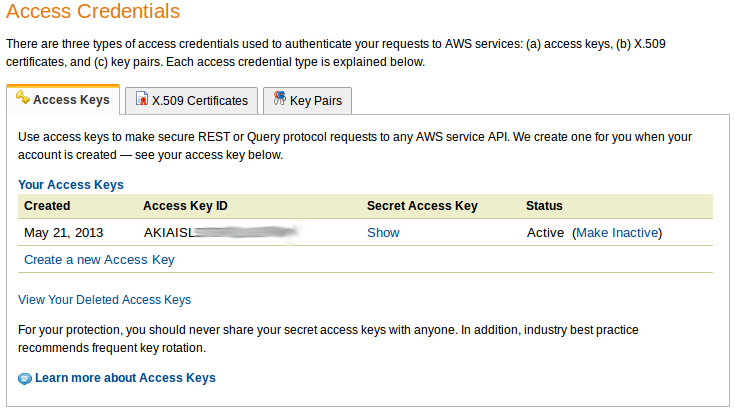
You can use one of the listed keys or create a new one with “Create a new access keys” (confirm with Yes after the prompt). The last parameter is the bucket name. List of existing buckets or the capability to create a new one are available on S3 Management Console.
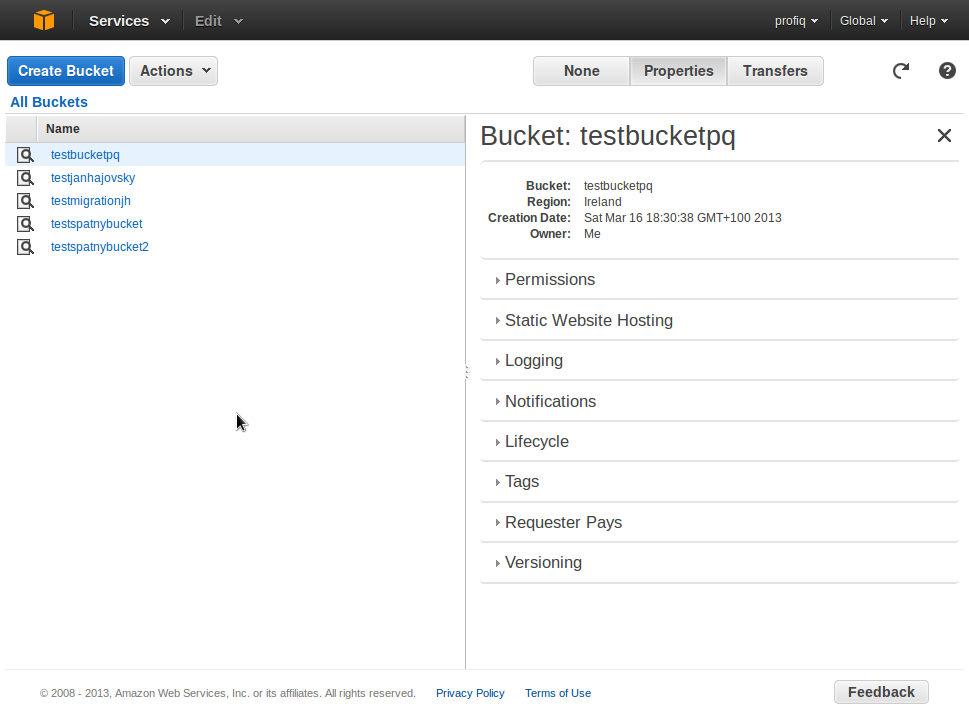
If you don’t want to use existing buckets or you don’t have a bucket created yet, continue with “Create Bucket”. You will be prompted for bucket name and region. Bucket name has to be unique in the whole Amazon S3 library. Region is the place, where the bucket and all it’s content is saved. It’s recommended to use the nearest one for the highest speed between your server and Amazon S3 server. The option “Create” immediately creates a new bucket or advanced users can continue with “Set up Logging” and set some additional data such as permissions or logs.
Setting up Liferay with Amazon S3
If you have a clean Liferay installation or you are setting up a clean document’s library, go on with reading. If you have already uploaded documents and want to move them from the local storage to Amazon S3, you need to use data migration tool for which I’m planning to post some details in coming weeks.
Set up Liferay with Amazon S3 without data migration
We need to tell Liferay, that it should use Amazon S3 storage instead of local storage and provide access information to S3.
Open (or create) file named portal-ext.properties in
Tomcat: TOMCAT-HOME/webapps/ROOT/WEB-INF/classes/
Jboss: JBOSS-HOME/standalone/deployments/ROOT.war/WEB-INF/classes
or wherever you have installed your Liferay and paste in:
dl.store.s3.access.key=AKIAISLS742SLYC2QWQR
dl.store.s3.secret.key=PxQvaT1uKSeso/SBrm7CjcWQJeFdbJOqLhxkt5wV
dl.store.s3.bucket.name=testbucketpq
dl.store.impl=com.liferay.portlet.documentlibrary.store.S3Store
Replace example values with your correct values, save changes and restart your application server (Tomcat, Jboss, ..). Liferay will start with Amazon S3 as it’s storage/repository for documents, images, videos etc.
To use Liferay now with Amazon S3, deploy Documents and Media Portlet where you can upload files and manage your documents.
Tests
It is good to test, if it works as it should.
- Try to upload a document to the document library (via Documents and Media Portlet) and check on Amazon S3 console. File should be uploaded correctly in Liferay’s Documents and Media Portlet and should appear via Amazon S3 console.
- Note: If you want to get better understanding of the Liferay’s file structure, then it is well described at official Liferay guide in section “Using the File System store” (same structure is used on Amazon S3 servers).
- Advanced users should check log of application server on which Liferay is deployed to see potential errors coming. Log file is located at:
Tomcat: TOMCAT-HOME/logs/catalina.out
Jboss: JBOSS-HOME/standalone/log/server.log
Finish
That’s it. Now you can use Amazon S3 storage. You no longer need to have an own storage, because you are leveraging the one from Amazon S3 and pay on demand for the space that you actually use. Next time we will explore Liferay’s data migration feature to and out of Amazon S3.