





Kinetica: The Next Generation of GPU Databases

1 min read17.6.2018

“Data will be the raw material of the 21st century.”__Angela Merkel - World Economic Forum 2018
In IT, innovation and rapid change are constant. New technologies and frameworks are created daily. Rapid evolution of JavaScript and the world of web is a good example. The database world, on the other hand, has been relatively stable and changing slowly for decades. This does not imply that innovation is not happening. Databases are stable, time-tested, well-optimized, and improved yearly. The pace of innovation moves at a different rate though than in other parts of the IT world.
With the expansion of the digitalization, we are gathering more data than ever. The amount of data in the digital universe is doubling every two years, according to current trends. We are expected to have 44 zettabytes of data by 2020. But without analysis, this data would be worthless. This past year has been a time of disruptive innovation in the database realm. A new generation of GPU-powered databases has emerged, driven by digitalization and data analytics.
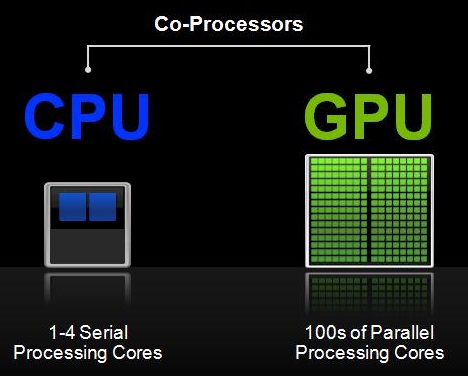
Traditional CPUs have been surpassed by GPUs when it comes to repeating tasks on a large amount of data. GPUs contain thousands of cores which can be effectively parallelized, which leads to a massive acceleration when working with big data.
Why Use A GPU DB?
- Up to 100x faster processing speed compared to CPUs
- Process visualizations in real time since data is processed on the graphics card
- Data analysis team can work with real-time data
- Ideal for very complex databases
- Smaller number of servers needed to maintain.
Can GPU Databases Replace CPU Databases?
 Source: NVIDIA blog
If we consider the speed of some operations, CPU speed will always be faster than GPU speeds. There are operations that cannot be effectively parallelized, for example, working with text or Online Transaction Processing (OLTP) workloads. GPUs break up a huge task into thousands of smaller ones which it can divide into thousands of its cores. This means that GPU can’t really fully replace CPU databases. We will definitely see systems which will utilize both CPU and GPU — such system will check the query and decide if it’s better to run them on CPU or GPU. There are fields where GPU databases really shine, such as data analytics. It might not be worthwhile to use them for operations that cannot be parallelized, such as OLTP workloads, as mentioned earlier in this post.
Which GPU Database Should I Use?
GPU databases are growing in popularity. Several companies have introduced their own products which utilize GPU computing power. They include Kinetica, SQream, MapD (renamed to OmniSci), PG-Storm, and Blazegraph.
As with CPU databases, not all GPU databases are suitable for every task, so you need to choose your GPU database solution wisely, according to your requirements.
Some databases may be more suitable for relatively small data up to 10 TB (e.g. Kinetica), some for larger data over 10 TB (e.g. SQream). Some also contain useful tools for analyzing and visualizing data and other benefits.
Read on for our test drive of Kinetica.
Introducing Kinetica
What is Kinetica?
- Kinetica is a primary database which includes most features of classical databases like MySQL, PostgreSQL, etc.
- Kinetica provides GPU accelerated computation speed along with advanced tools for analyzing and visualizing data and a user-friendly interface
The Kinetica platform
The platform can utilize only CUDA from Nvidia, so there is no support for AMD cards. It also runs only on Linux-based OSs. This is an obvious choice as it’s expected to run these on the servers. Let’s just quickly highlight some characteristics / benefits of the platform:
- It can utilize both RAM and vRAM memory
- Full SQL query support with CRUD operations, aggregations, subqueries
- Multi-table and multi-column joins
- Geospatial support
- Supports different APIs: C++, C#, Java, JavaScript, Node.js, Python, and REST
- Connectors for Apache Hadoop, NiFi, Spark, Storm and Kafka
- Can also be connected to popular BI tools such as Tableau, MicroStrategy and Power BI through its certified ODBC/JDBC connector
- Bundled with TensorFlow, BI and Visualization tools
Installation
Kinetica has a pretty good guide for installing the DB. They support all major Linux distributions (Debian/RHEL/Suse-based) and both x86 and PPC architecture, which can come handy if you have a rare server farm.
They also support and include images for Docker, which is really nice, but you will need NVIDIA Runtime container for docker installed, which only supports Linux. If NVIDIA adds Windows support, we should be able to run Kinetica DB or at least cluster nodes also on Windows hosts in Docker. Although Kinetica is GPU powered Database, they also offer option to install it on CPU only host.
CPU-only Node
The installation of the CPU machine is pretty straightforward. We did not have any problems installing it. Just followed the install guide step by step.
GPU Node
The installation for GPU machine was a little bit more complicated. Before installing Kinetica you need to first install NVIDIA CUDA drivers. If you create a new machine for the database, we strongly recommend using the supported OS version by CUDA Toolkit. We had a machine with Ubuntu 18.04 Desktop, which is as of this writing not yet supported. At the end, we were able to install the drivers, but we had to do some extra steps and troubleshoot several problems.
Once the driver is installed, the installation of Kinetica itself is again easy.
Overall, if we don’t take into consideration the installation of NVIDIA CUDA drivers which are general for any CUDA-powered software, we have to say that the installer is well done. It automatically creates new users, registers services, and handles all dependencies. If all software solutions would have an installer as simple to use as Kinetica’s, it would be really easy to set up servers.
The User Interface
Kinetica provides clean, modern, and user-friendly web interfaces. This is really nice because it means that you can access the database management interface from any computer running a web browser regardless of its operating system.
When you start your database, you can see your cluster and other information about used resources. Although you will probably access the database using APIs, such interface is definitely welcome.
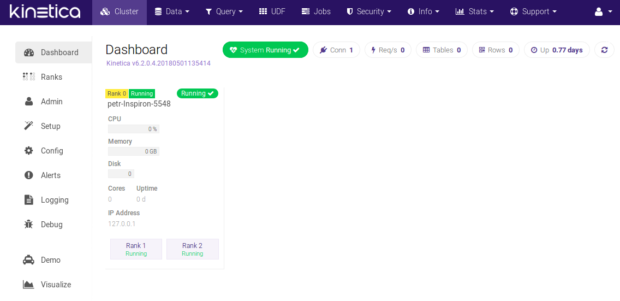
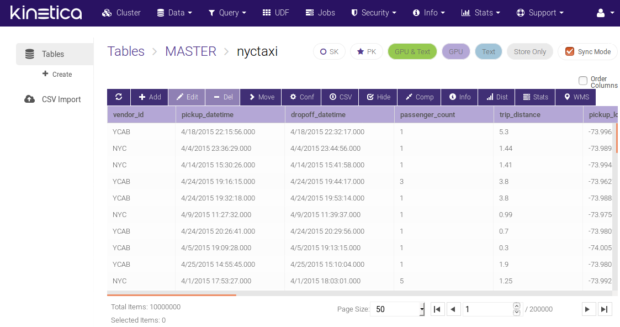
If you want to evaluate the database in the same way we did, you can use some of the five different data sets Kinetica provides. We used an NYC taxi data set which consists of geospatial data.
The table explorer is quite nice and seems to offer all the necessary functions you would need to work with it.
KiSQL is the name for the tool that enables performance of SQL queries. It has a nice auto-complete feature, but also has some restrictions.
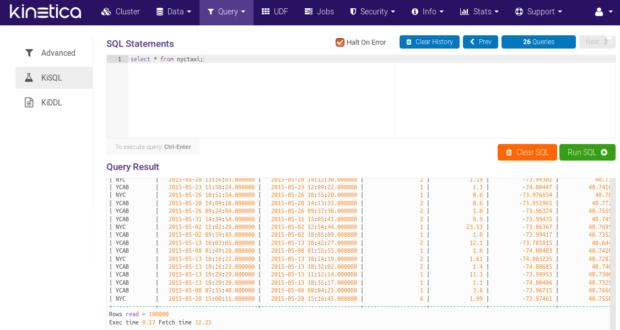
There is also an option to use KiDDL tool which allows you to generate DDL from tables, collections, and other database entities.
The admin interface provides more information about current running jobs, security, information, and several logs and statistics about your database.
Data Visualization
What really impressed us was built-in data visualization. As we mentioned earlier, the NYC Taxi dataset has geospatial data which can be rendered on the map. The analytics dashboard is already prepared for this example with some really nice charts, which can be created and configured by users to display any information they desire.
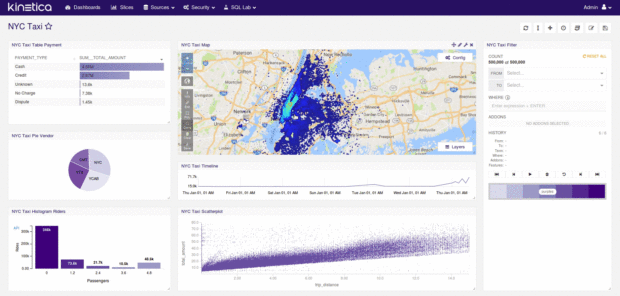
We worked with just a small table of 6.5M records. Displaying data charts was nearly instantaneous, and individual queries took just a few milliseconds.
Other Benefits
We also tried their User Defined Functions which is equivalent of stored procedures. They can be written in C++, Python, or Java. The support of Python is really nice as it’s often used for scripting by data analysis teams. This is a nice feature because not all GPU databases supports this.
As we mentioned in the overview there are other interesting features of Kinetica. If you are interested in exploring them we recommend to take a look at the documentation.
Conclusion
GPU databases might not be ideal for everyone yet, but there are several use cases where using such databases can speed up tasks significantly, and open doors for real-time analysis, which was not possible until now.
Kinetica seems like a mature product. It has connectors to other software solutions for easy integrations, and allows connection to other visualization tools. The fact that they have built-in data visualization is a really pleasant surprise. If you are looking for a GPU database, and Kinetica meets your requirements, it’s definitely worth trying.