




Real-time control of your app features with Split

8 min read30.1.2018

At profiq, we often research and demo new and interesting modern technologies. One interesting Silicon Valley startup called Split (http://www.split.io/) caught our attention with its recent launch of the Feature Experimentation Platform.
The Feature Experimentation Platform is intriguing because it lets developers rapidly iterate product features, target them to customers, and measure their impact in one unified solution. It consists of an SDK for various languages and a cloud service console that lets you control and monitor features of an application in real time.
Because we could potentially use this solution in some of our projects, we created a use case and demoed it. Here is the use case and an overview of the platform.
Use case example
First, let’s imagine a scenario where you just deployed a new version of your huge software application to production. The deployment process took several hours. You have great QA, you tested everything, but you just found a blocker bug in a changed feature.
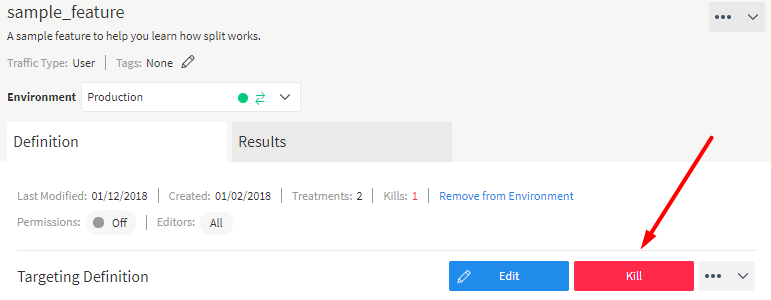
What should you do? The engineering team would probably start working on the fix and prepare to roll out new version of the whole product. But if you were using the Feature Experimentation Platform, you would disable the new feature and replace it with the old one with a simple click in the web interface (the Kill Switch feature), without needing to change even one line of code. Let’s talk about the Feature Experimentation Platform in more detail
The main concept
The Feature Experimentation Platform is not that complicated to use. You have a simple IF in your code and you control which feature or part of the code is executed. The condition in the IF is evaluated based on large set of rules which were downloaded when you started the app from the cloud service. These rules are also updated and cached every 30 seconds when your app is running for fast evaluation without any delay caused by I/O.
All we needed to make this work was to add a few lines to our code:
 var treatment = client.getTreatment('sample_feature');

  if (treatment === 'on') {
      // insert on code here
  }   else   if (treatment === 'off') {
      // insert off code here

  }   else {
      // insert control code here
  }
Note: Not fully working code. The initialization of the SDK with user info is not shown.
The Management console
The online management console includes a great variety of settings and analytics tools you can use to set up your splits.
Here is little overview of the single split treatment control:
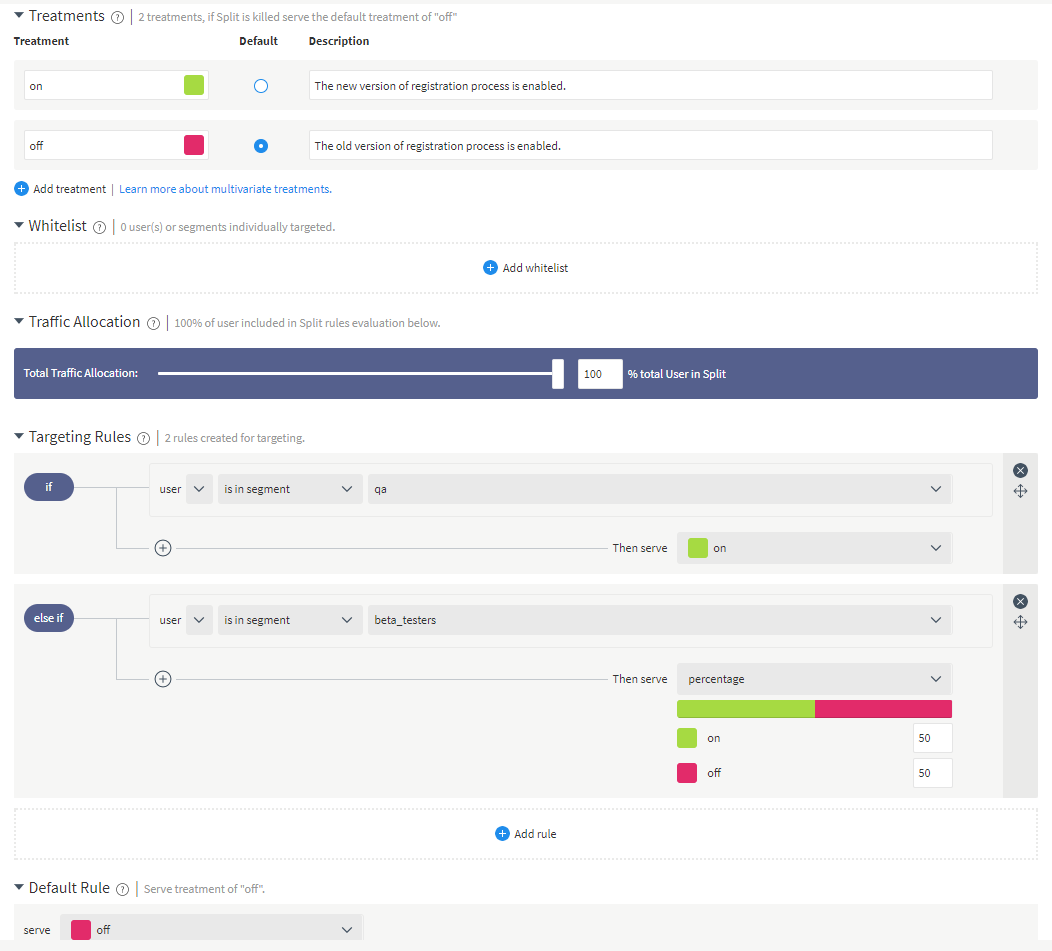
We’re using this screen to give you a little overview of some of the possible options you can set. We can target specific groups of predefined users and separate them into segments (user groups). In this example, we’re only showing the new feature to beta testers, QA, or to users who paid for it.
The targeting rules can support various and specific conditions. And, because everything is already coded in the app, if the customer likes the feature, we can quickly implement it by flipping the switch.
On the other hand, if we find that there is a serious issue with the feature, we can immediately use the Kill Switch to disable it regardless of the set conditions in the treatment:
Analytics
Here is a little overview of the analytics provided for a specific treatment (specific split).
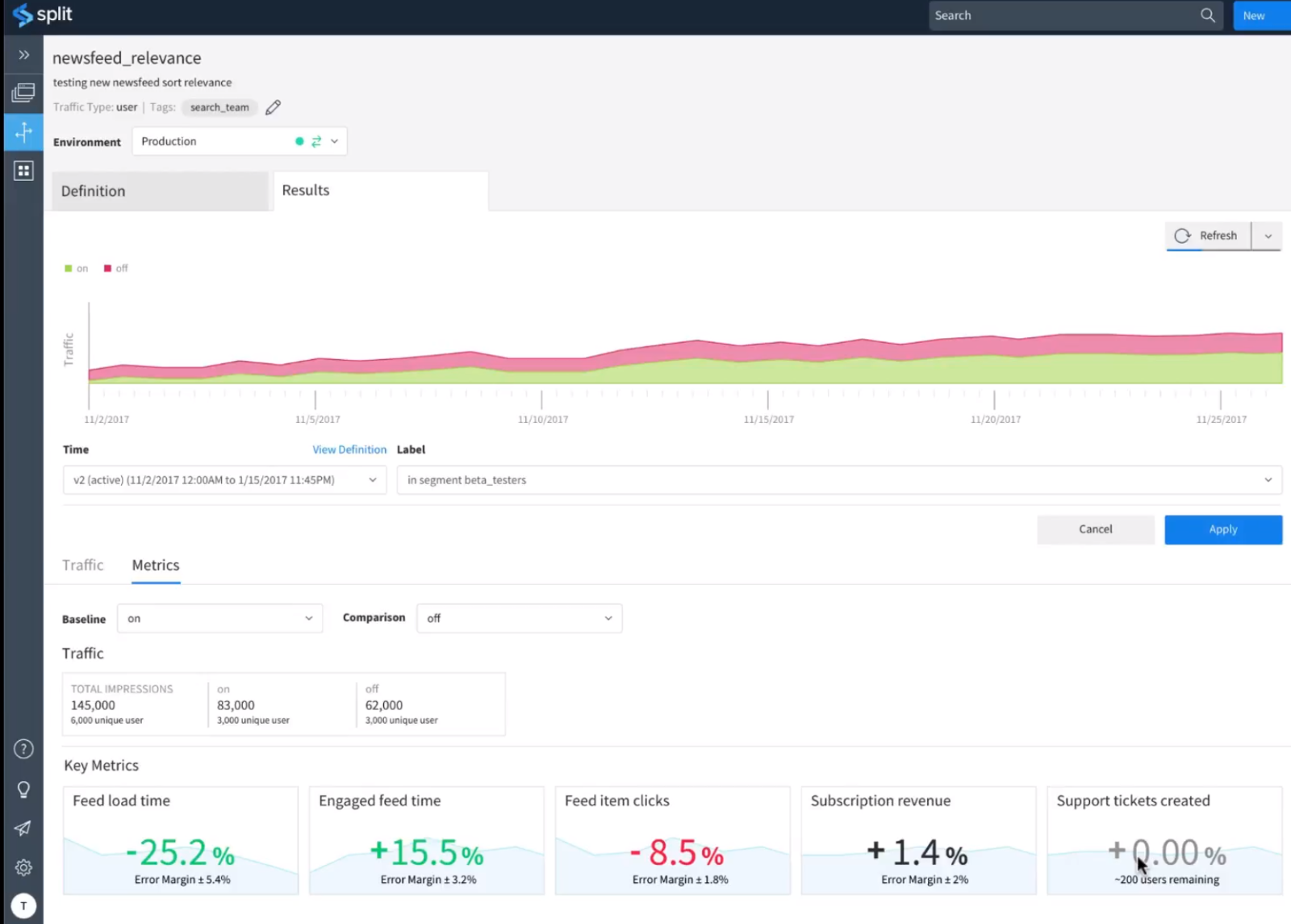
The platform includes more analytics information; this is just a little sneak peek. There are also features for A/B/n Testing, Data Ingestion and Metrics calculation, Automatic Feature & Event Attribution, Automatic Significance Determination, and more.
Furthermore, if the in-house analytics tools you’re using are not enough, there is also integration with the Segment API platform, which allows you to export the data into many other analytics tool such as Google Analytics or MixPanel.
Speaking of integrations, with the exception of Segment API, a lot of them are directly implemented in the Feature Experimentation Platform. For example, you can leverage the analytics of AppDynamics, Datadog, or Rollbar. You can link your splits directly to the tickets in Jira and get notifications on your favorite messengers such as Slack or Hipchat. Unfortunately YouTrack which we use in some of our projects is missing but hopefully it will be added in future.
Security concern
Because you are potentially getting control over your whole application, security should be a concern. I have found out that Split offers such enterprise-grade security as permissions and SAML. They also offer Two-Factor Authentication using Google Authenticator app for login.
The possible Use Cases of Feature Experimentation Platform
With the previous description of the features we can think about the use cases now. You can read about all of them on their website and I think each company/team may have different priorities and value them differently. But I would like to mention the most obvious.
Continuous Delivery – New code can be deployed anytime to production, because the new features implemented in the code are not enabled until they are ready for release.
Quality & Performance Testing in production – With split you can test specific features directly in production without showing them to customers.
Experimentation – Powerful A/B testing tool where you can measure impact of every feature.
Paywall – With targeting capabilities you can deliver custom or subscription-based features to different customers.
Other mentioned use cases are Trunk Development (All commits to one Branch) and Migrating to Microservices. But I think many teams can find different use of this platform
Is it safe to rely on external service? What if it fails?
When I tested the platform’s features with my application, I wondered if it was safe to rely on an external service when executing key parts of my code. For example, if the split evaluation fails, will customers not see a big piece of my application?
There are two main things mitigating that problem. The first is the uptime of the split API. You can check it out at https://status.split.io/, but for the last 90 days, the uptime was at least 99.99% for all the parts of the platform. This is useful but not that crucial because unexpected downtime can sometimes happen even to the best services.
The second and most important one is the way SDK itself is coded and the way you should use it in your application. In case of some unexpected error, for example, if the specific split treatment is not yet cached and there is network error or anything else, the control treatment is used
 var treatment = client.getTreatment('footer');

  if (treatment === 'on') {
      // insert on code here
  }   else   if (treatment === 'off') {
      // insert off code here
  }   else {
      // insert control code here
  }
As you can see form the code example, the control treatment is always evaluated in the default part in the split IF condition. The control code mentioned in the example should always be the default code of the given app feature, so if anything fails, the stable version of your application code is used.
Conclusion
To sum it up, Split’s platform provides a solution for many teams at a company, from engineering to data analytics, to product management. With a few simple code functions, we get many use case scenarios. It’s not complicated for the development team to implement and free open source SDKs are provided for all major programming languages.
It provides analytics tools which are not that unique, but with the combination of split features, we can change in real time, and with various controlled rollouts, we get an interesting platform we can leverage in all the aspects of the product life cycle.